
Cricut Design Space Updates

The very first update to Cricut Design Space, the online software used with Cricut Explore, was released on April 15th. And there were some awesome changes made that customers had asked Cricut to make via surveys they had sent out a couple of weeks ago. I am truly impressed with how Cricut has been so responsive to the needs of customers via this update and the incredible Customer Support they have been providing not only during the week but also many weekends.
Here is a list of a few of the highlights that were updated changes:
- Grid for mat was darkened to make it more visable
- Delete uploaded images is possible now
- No more need to ungroup to attach fonts to projects
- Color Picker added so you have more choices
- Image labels were changed to blue for easier viewing
- All cartridges can now be linked even if you have the subscription
- Material saver mode is automatically arranged on the cutting mat
- Wide images will automatically rotate so they fit on 12X24 mat size
- A single layer in a multi-layer font can now be attached and cut individually
- Changing canvas size for certain projects was fixed
- Text size will now remain unchanged after ungrouping a multi-layer font
Watch the video I made of the changes in Cricut Design Space:
There were a couple of other things I didn’t point out in the video that were added:
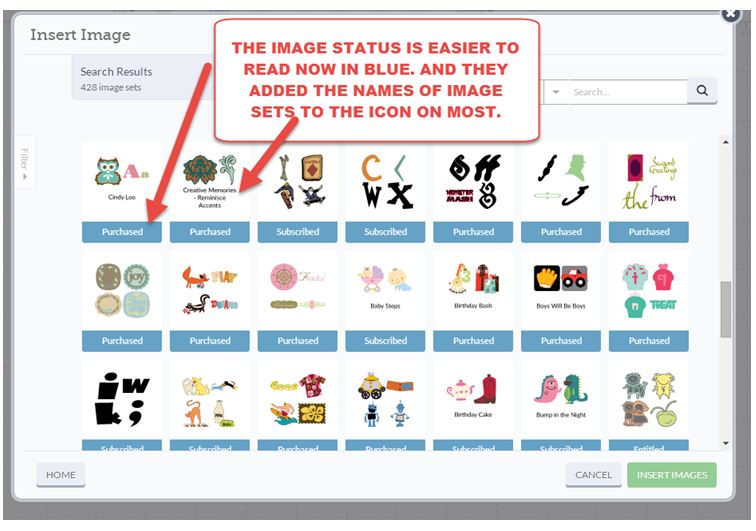
They also added more images to the cartridge icons so they were more identifiable at first glance. Hope they fix the few others that are still all black…we like color !
Another tip I wanted to point out was when you hover over an image, you will see the name of the image set/cartridge that image is in. That is actually a link you can click on and it will open up all the images within that cartridge.

So, lots of good things changed in the software and more are to come. Ashish Arora, CEO of Cricut said they will do updates every 10 to 12 weeks to continue to add features to Cricut Design Space based on customer needs. What a welcome change to the old way Cricut did requested updates.
We also can look forward soon to the release of the Blue Tooth device (purchase separately) to enable our Cricut Explore to communicate with the iPAD to use with the Make It Now Projects. And later in the year, we are awaiting the Print N Cut Feature being added to Cricut Design Space so more fun things to learn in the future too.
So,what was your favorite feature added to Cricut Design Space? What else do you want to see added?

All my comments are my own opinions on those products. I appreciate your support when you purchase using the post links.
Jeannie Stevens
I’d like to see us be able to add our own files to design space. When I create a image I’d like to save it and use it another time instead of havinf to go through the process of making it again