
Cricut Newsflash !
Cricut released a couple of fun things I wanted to share with you all. They were too good not to share right away so I am putting them both in the same post so read on !
Cricut released a SECOND Mystery Box this month ! And this one is full of NEW Cricut Materials you can cut with your Cricut Explore. See what’s inside and the tips I have for what you would use the materials on. It is an amazing deal to get your hands on some of these new materials just in time for making your holiday crafts.
Thanks for purchasing HERE to help support me bringing you more Crafty goodness. Use FREESHIP to get free standard shipping in US.
And Cricut released an UPDATE FOR IPAD AND IPHONE CRICUT DESIGN SPACE APP ! Just update the app like you would any other app on your device.
Before you can ask, no the Android App is not out yet. It is still in development but it IS coming in early 2016 according to Cricut. So hang tight Android users…your APP Day is coming too. I will announce as soon as I hear more. Now back to the iPAD/iPhone App News…
The new iPAD/iPHONE features include:
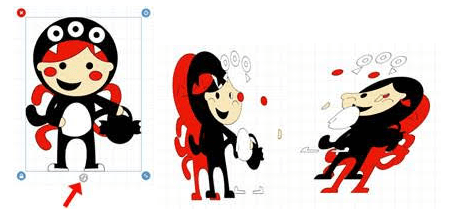
– 3D Visualization handle on the canvas (its on bottom center of the handles). It allows you to get a 3D view of your image layers when you grab the handle and rotate it. Just let go of the handle and it snaps back to regular view. Just a super fun way to see all the layers of your images.
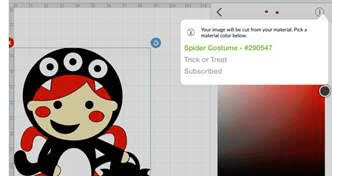
– Image layer information displayed on the canvas (like we have now in desktop version). You can now find out what is the name of the image you used, image #, which cartridge it came from AND type (subscribed, purchased, free or price) Pretty darn cool to have this now available.
– Grid line numbers on the mat preview. Before on the APP we saw the grid but not the measurements…now we see both !
And they fixed a couple of buggy things.
Go Download or Update the APP…Go Play with it ! I just love having it on my iPhone to create designs when I am on the move and come back home later to create. It just speeds things up so much quicker!
If you like the iPhone or iPad App, please leave a review in the APP Store. Cricut would appreciate hearing your feedback on it and other viewers would like to know too.

All my comments are my own opinions on those products. I appreciate your support when you purchase using the post links.